When we were planning to set off on our year-long travel adventure, we knew that we were going to take a lot of photos. We debated whether or not to purchase a “real” digital camera or simply rely on our iPhones. With our limited luggage space and tight budget to consider, we decided to stick with the iPhones and purchase a few accessories to maximize their usability. We are four months into our trip and we have no regrets.
1. The iPhone Wrist Strap There is something incredibly comforting about using a camera with a wrist strap or a neck strap. In the past, I’ve often been taking photos with my iPhone and been paranoid that I’d drop it or set it down and lose it. Then, I came across this iPhone Wrist Strap on Photojojo.com. It’s given me the confidence to whip out my iPhone to take photos while ziplining, riding an elephant, careening down the road in a Tuk-Tuk, and lots of other situations where I would have felt is was too big of a risk that I’d drop it. Honestly, I use it whenever I am holding my iPhone, not just for photos. Continue reading Travel iPhoneography→
Camera+ is a powerful and feature-rich photography app for the iPhone. It debuted in 2010 as one of the earliest Camera app alternatives and set the bar for the genre. The app has maintained its well-earned popularity due to the developer’s consistent updates to add features and address user feedback.
Designed to make taking great photos as easy as possible, Camera+ does just that. Whether you are a professional photographer or an amateur shutterbug, you’ll be impressed by what this app has to offer.
camera+
Shooting Options
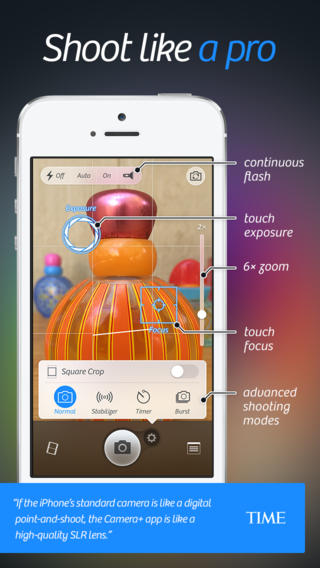
You’ll be pleased with all of the great features to help you capture the perfect image. The quality of our photos was immediately improved simply by the ability to independently set and adjust exposure and focus by touch. We also appreciate the 6× zoom control, composition grid, image “stabilizer,” self-timer, and burst mode.
camera+
Editing Options
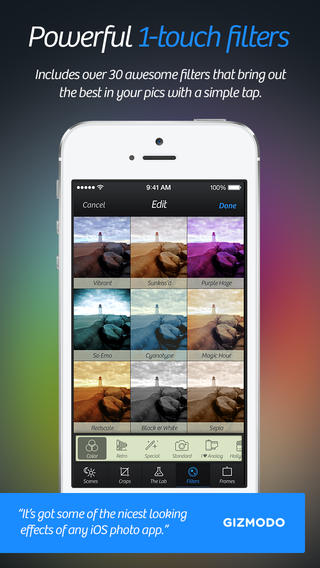
When you’re ready to edit your photos you can use the slick interface to apply digital-camera-like scenes, add effects defined by professional photographers, create layers, edit balance, add borders, rotate, and crop your images to your specs or select from several standard sizes.
camera+
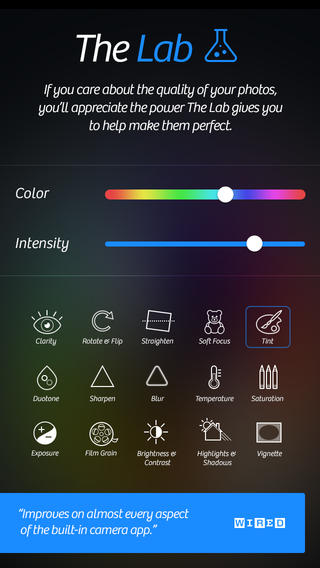
The Lab
The recent release of Camera+5 introduced The Lab, which the developer describes as “world-class photo editing” for the iPhone. Here you’ll find Clarity Pro, a tool that allows you to adjust clarity and vibrancy of your photo using separate sliders. Just as simply, you can straighten an image, adjust tint and duotone, add soft focus, add film grain, sharpen and blur your images, as well as adjust saturation, temperature, exposure, brightness and contrast, highlights and shadows, or add a vignette.
Managing and Sharing Images
Your photos can be found in the app’s Lightbox. There you can view them, decide which to save as-is, which to edit and which to delete. If you want to sync your Camera+ photos between all of your devices, then you can use the iCloud Lightbox feature. You can save images from the Lightbox into your device’s camera roll and share it to Facebook, Twitter, Flickr or send it in an e-mail or text message. There’s also an option to AirDrop photos to Instagram or Evernote.
Photo Info Camera+ captures photo metadata and displays it on a card-like popup. You can easily find when photos were shot, their dimensions and sizes, edits you’ve applied, location info, and finer details such as ISO, focal length, and shutter speed.
As someone that enjoys recording special moments, but isn’t particularly knowledgeable about the art and science of photography and photo-editing, I find Camera+ to be very usable and there is no doubt that it will help anyone take better photos.
Camera+ 5 for iPhone is now available for $1.99 on the App Store and requires iOS 6.0 or later; the update is free to existing customers.
Although we prefer vacation rentals to hotels, there are times when a hotel makes more sense and provides more options. Here are 3 apps that offer excellent discounted hotel rates by focusing only on truly last-minute rooms.
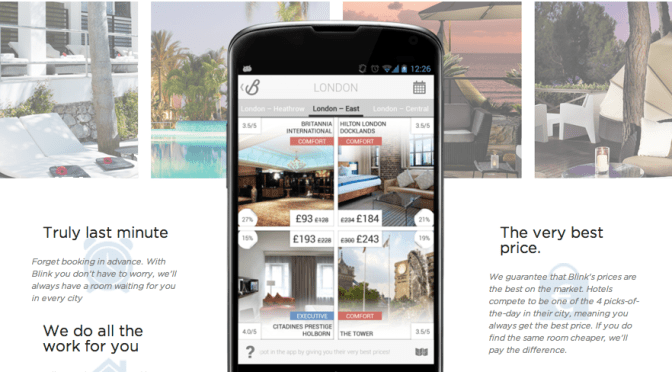
With Blink by Groupon, you get to see only premium hotels at the lowest possible prices in an instant. They offer up to 70% off, with significant savings even at peak times.
FEATURES
Exclusive LOW PRICES GUARANTEED!
The BEST handpicked hotels
4 INCREDIBLE DEALS every day in over 200 European cities
Book a room in just a few taps Last-minute reservations
HotelTonight, the app that provides access to special deals for hotel rooms available that very evening. They’ve added French, German, Italian, and Spanish, so international users will get a localized view in their own language.
FEATURES
Exclusive, astonishingly LOW PRICES on incredible hotels
Same-day, FAST AND EASY bookings until 2am!
GREAT DEALS each night in a growing list of cities
Book for MULTIPLE NIGHTS
We limit the deal selection so we can negotiate with hotels to get you the BEST RATES possible
Best rate GUARANTEE
24/7 real-person customer support via phone or email
Hot Hotels operates in 23 countries and 167 cities enabling customers to book hotel rooms “last minute”, with discounts of up to 50% per booking. They’ve become the first ‘last minute hotel booking app’ to enable a social booking experience on its mobile app. And, they offset the carbon emissions associated with each hotel stay booked through its platform, free of charge to the user.
FEATURES
Exclusive, astonishingly LOW PRICES on incredible hotels we personally vet.
Same-day, FAST AND EASY bookings until 3am!
Booking passes: Download your booking passes onto the app or on Passbook now available for iPhone with IOS 6 operating system.
Souvenir is a French verb meaning to remember. A travel souvenir is meant to be an object that recalls a certain place, occasion, or person. If that’s the case, then why do travelers buy souvenirs as gifts for people back home? Although the gift may have some significance to those traveling, it has little to no significance for the recipients of these gifts.
Feliz Navidad from Playa del Carmen
Instead, when you travel, buy souvenirs only for yourself and sparingly. Choose only items that will truly help you recall some special memory when you look at them. Personally, we like small locally made handicrafts or Christmas ornaments as souvenirs. Find opportunities to use or display your mementos throughout the year. It always helps to put a smile on your face and inspires future journeys.
If you’re traveling outside of the US and you want access to a cell phone, without the risk of racking up a staggering phone bill, then you have a few options to choose from.
1) Go Global With Your Plan: This is an option if you’d like to use your own phone. Contact your wireless carrier and ask them to set you up with a global coverage plan for the length of your trip and then switch back to your regular plan when you return. This the most convenient, but the most expensive option.
3) Swap Your SIM Card: This is another option if you’d like to use your own phone and it is “unlocked”. Simply purchase a SIM card that works at your destination or worldwide. You can either order one online before you leave or you can purchase one upon arriving at your destination. If you choose the later, then you will need to research where to find these in your destination, but they can generally be found at a variety of locations such as cell phone kiosks and convenience markets.
4) Internet Phone: If you don’t require 24×7 phone services and you have a smartphone, then you might consider simply using your phone when you have an Internet connection. Both Skype and MagicJack Plus make that possible, MagicJack Plus requires a one-time hardware purchase, with Skype you buy credit or pay a monthly fee. Just create an account, download the mobile app to your phone, locate a WiFi connection, and make calls at no additional cost.


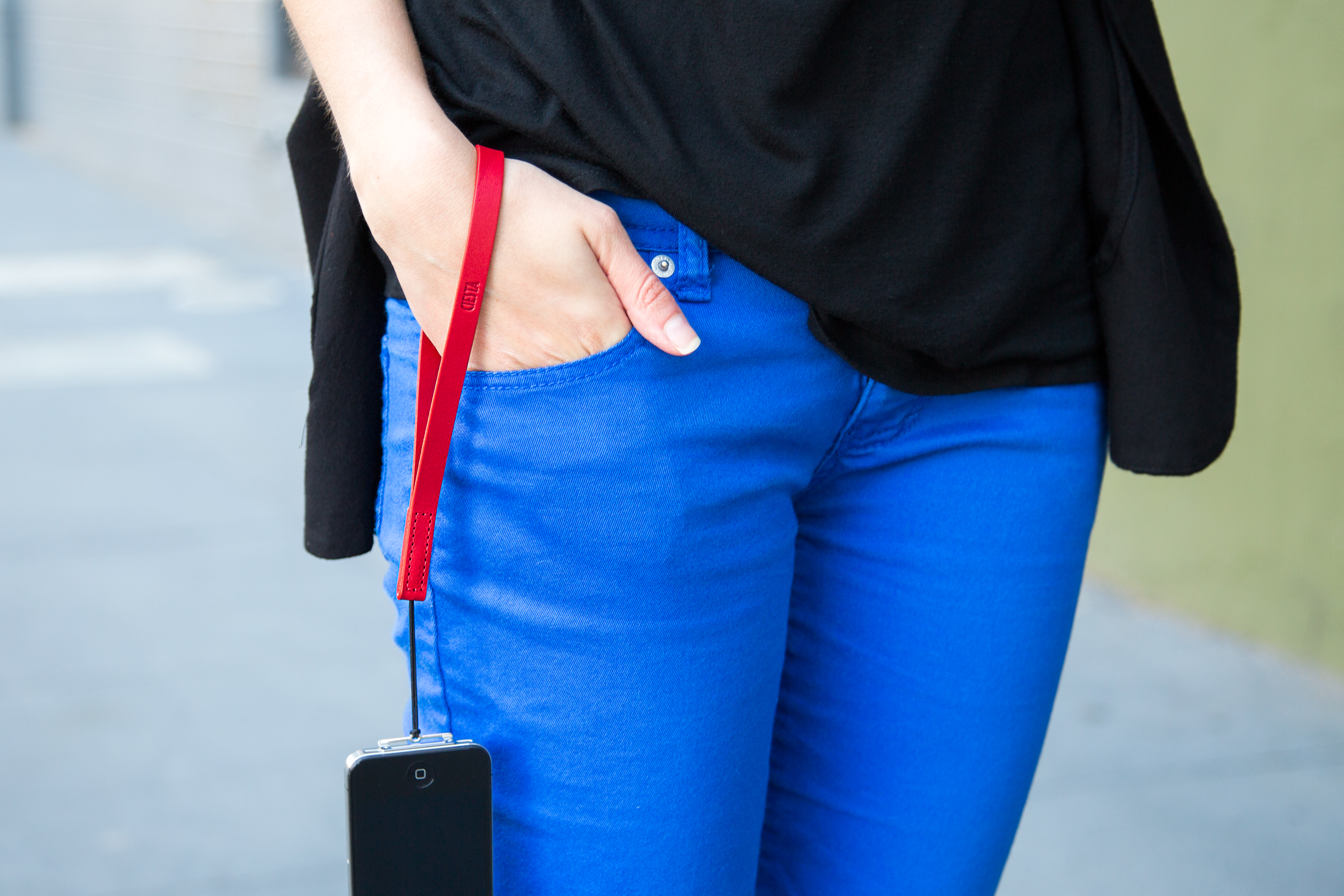 There is something incredibly comforting about using a camera with a wrist strap or a neck strap. In the past, I’ve often been taking photos with my iPhone and been paranoid that I’d drop it or set it down and lose it. Then, I came across this iPhone Wrist Strap on Photojojo.com. It’s given me the confidence to whip out my iPhone to take photos while ziplining, riding an elephant, careening down the road in a Tuk-Tuk, and lots of other situations where I would have felt is was too big of a risk that I’d drop it. Honestly, I use it whenever I am holding my iPhone, not just for photos. Continue reading Travel iPhoneography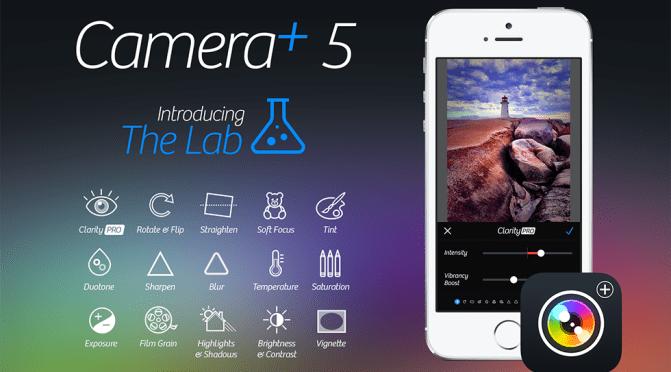



 Meandering Family: Beyond the Nest